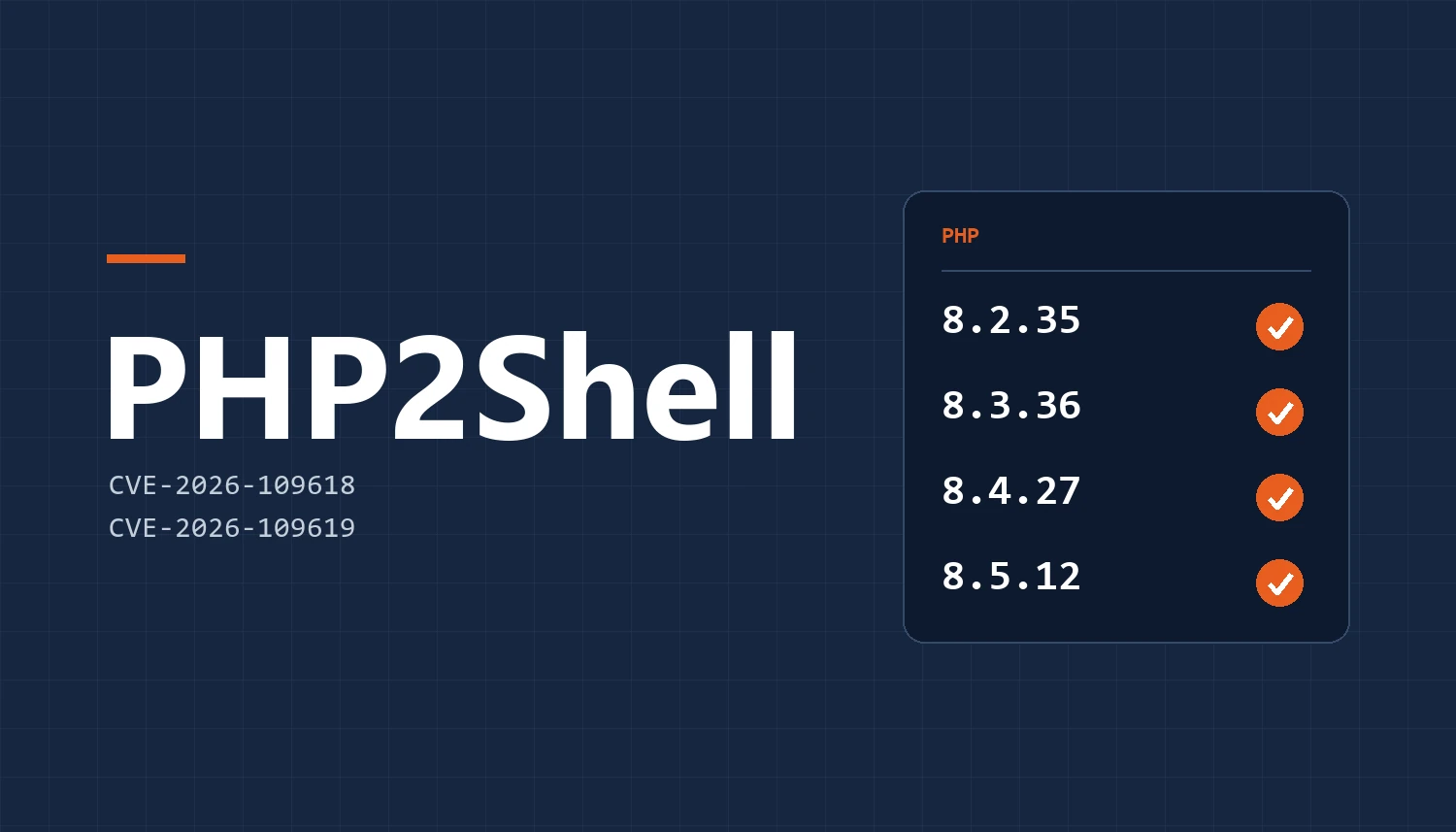
No. PHP2Shell is a flaw in PHP, the engine that runs WordPress, not in WordPress itself: only a patched version of PHP on the server closes it (8.2.35, 8.3.36, 8.4.27 or 8.5.12, released on October 21, 2026). You can check yours in one minute under Tools › Site Health.
Since 2018, my team at Gamache Média, a web agency in Saint-Lambert, has been helping SMEs across Greater Montréal with their online presence. We design their websites, and we host them for many of our clients. We see security alerts all the time. Most of them affect a specific plugin and are fixed with an update inside WordPress.
The PHP2Shell vulnerability, patched on October 21, 2026, is different. You may have seen the headline in La Presse: a critical flaw threatens 70% of websites. The figure reflects how widespread PHP is: it runs the vast majority of websites whose technology is known, starting with WordPress.
Picture this: you read that headline over your morning coffee. You open your WordPress dashboard, everything is up to date, and your security plugin shows its green check mark. You relax. You shouldn’t: this time, neither WordPress nor the plugin can do anything about it.
What is PHP2Shell?
PHP2Shell is the name given to two critical PHP vulnerabilities, CVE-2026-109618 and CVE-2026-109619, patched in an emergency release by the PHP project on October 21, 2026. They let an attacker run code on a web server without an account or a password. Three facts explain why everyone is talking about it.
A single request is enough. An attacker can run their own code on the server, which opens the door to everything else: a backdoor, a copy of your database, spam sent in your domain’s name. The PHP project rates each of the two flaws 9.2 out of 10 for severity.
The flaw leaked before the patch. Its existence was known before the scheduled release date, proofs of concept are circulating publicly, and Cloudflare has already reported exploitation attempts. The UK’s National Cyber Security Centre (NCSC) recommends taking offline anything that cannot be patched quickly.
Every setup is affected. Apache with mod_php (the most exposed case), PHP-FPM, php-cgi, FrankenPHP, LiteSpeed: every way of serving a PHP website is affected. And versions 8.1 and older will not get an official release.
Why doesn’t an up-to-date WordPress protect you from PHP2Shell?
Because PHP2Shell isn’t in WordPress. A WordPress or plugin vulnerability sits in your website’s code, while PHP2Shell sits one level down, in the engine that runs that code. The attack happens when PHP reads the request, before WordPress even starts.
| Compare | WordPress or plugin vulnerability | PHP2Shell |
|---|---|---|
| Where it is | In the website’s code | In PHP, the engine that runs that code |
| Who fixes it | You or your agency, from WordPress | The server administrator: your hosting provider, or the agency that hosts your site |
| Security plugin | Wordfence, for example, can block the attack | Arrives too late: the attack happens before WordPress |
| Where to check | Dashboard › Updates | Tools › Site Health › Info › Server |
An important caveat: a firewall in front of your site can block the attack variants already known, and Cloudflare has deployed rules for all of its customers, including those on the free plan. That is a stopgap. The PHP project is clear: only updating PHP fixes the flaw.
A real case: our October 21
For the sites we host, the Gamache Média team went through everything on the day the patch came out. In order:
- List everything that runs, including subdomains and staging copies. These working versions, forgotten once the new site is live, are just as vulnerable as the main site.
- Change only one thing. The control panel offered several updates at once, and an “Update all” button. In an emergency, that is the trap: if a site breaks after five changes, there is no way to tell which one caused it. We applied the PHP update only.
- Check every site, before and after, bypassing the cache. Result: every site responded exactly as before.
The next check is the one that changed everything. The control panel’s summary showed “8.3” everywhere. We didn’t take its word for it and opened the Site Health page of a WordPress site. It showed a different PHP version, one the update had not touched. Many hosting servers, especially those running CloudLinux, run several versions of PHP side by side: the server’s own, and the ones that actually serve the websites.
Stopping at the summary would have meant concluding that everything was fixed when the sites were not. So we also fixed the version that serves the sites: by noon on October 21, Site Health showed a patched version of PHP. Then we looked for signs of intrusion, in the server’s security tool incidents, in PHP files dropped since October 20, and with a new full malware scan. Result: no infection.
How do you check your PHP version in one minute?
In WordPress, the Site Health page shows the exact PHP version your site uses. Log in, then:
- open Tools › Site Health, Info tab;
- expand the Server section;
- read the PHP version line.
Then compare it with these benchmarks:
- 8.2.35, 8.3.36, 8.4.27, 8.5.12 or later: your site is patched.
- A lower number in 8.2, 8.3, 8.4 or 8.5: email your hosting provider today.
- 8.1, 8.0 or 7.4: patched only if your provider applied the fix itself, and the version number does not change. Ask for written confirmation.
- 7.3 or older: no fix exists. Move to a recent version without waiting.
What counts is the version the site reports itself, not the one a control panel displays. No access to WordPress? Ask whoever manages your site for the full version number.
Your version isn’t patched, or you can’t find the Site Health page? Email our team: we’ll tell you where you stand and what to do.
What should you ask your hosting provider?
If we don’t host your site, four questions are enough to find out whether your provider has dealt with PHP2Shell.
1. Which PHP version actually serves my site?
Ask for the full number (8.3.36, not just “8.3”), and for the version that serves the site, not the server’s. As we saw above, the two can differ.
2. Have the backported fixes been applied?
If your site runs PHP 7.4, 8.0 or 8.1, the PHP project released minimal fixes that each provider has to apply itself. The version number does not change: only written confirmation will tell you.
3. Is a firewall blocking known attacks in the meantime?
Insist on “blocking.” A firewall can be set to only report attacks without stopping them.
4. Have you looked for files dropped since October 20?
A patched flaw says nothing about what may have gotten in before. A scan of recent files, especially in the images folder, is the simplest way to find out.
Your hosting provider is slow to answer or vague? That is often a sign it is time to switch. Let’s talk about hosting your site.
How do you know if your site was hacked?
Four signs should raise a red flag in the weeks following PHP2Shell:
- .php files in wp-content/uploads. This folder holds images and documents: a PHP file has no business being there.
- Administrator accounts you didn’t create, under Users.
- Redirects to unknown sites, sometimes only on mobile or from Google, to go unnoticed.
- A security warning in Google Search Console.
If in doubt, ask your hosting provider for a full scan, and change your administrator passwords once the fix is in place.
Seeing one of these signs on your site? Contact us today: we’ll work out with you where to start, with no commitment.
Where to start
Run the one-minute test today. If your version is patched, great: keep the four questions handy for the next alert anyway. If not, email your hosting provider before the end of the day.
If we host your site, there is nothing for you to do. If our checks turn up anything that concerns it, we will contact you directly. And if your account still has an old staging copy you no longer use, let us know: we will shut it down.
At Gamache Média, in Saint-Lambert, we treat hosting like the rest of our work. Someone reads the security advisories the same morning, changes one thing at a time, checks every site before and after, and reads the real version instead of trusting the dashboard.
PHP2Shell: frequently asked questions
Does Wordfence protect against PHP2Shell?
No. Wordfence and other security plugins run inside WordPress, while PHP2Shell is exploited when PHP reads the request, before WordPress starts. Only a PHP update on the server (8.2.35, 8.3.36, 8.4.27, 8.5.12 or later) fixes the flaw. These plugins are still useful against WordPress and plugin vulnerabilities.
Which PHP versions fix PHP2Shell?
Versions 8.2.35, 8.3.36, 8.4.27 and 8.5.12, released by the PHP project on October 21, 2026, and every later version in those branches. For PHP 7.4, 8.0 and 8.1, the project only released minimal fixes that the hosting provider must apply itself, without changing the version number. PHP 7.3 and older have no fix at all.
Does PHP2Shell only affect WordPress sites?
No. PHP2Shell affects PHP itself, so any site served by PHP: WordPress, WooCommerce, Drupal, Joomla, Magento or a custom application. Every way of running PHP is affected, from Apache with mod_php to PHP-FPM and LiteSpeed. If your site is written in PHP, its version must be 8.2.35, 8.3.36, 8.4.27, 8.5.12 or later.
Who has to fix PHP2Shell on my site?
The server administrator: your hosting provider, or the agency that hosts your site. On shared hosting, you cannot update PHP yourself, but your control panel often lets you pick a newer version. After any change, check the number under Tools › Site Health: what counts is the version your site actually uses.
My site runs PHP 7.4: is it at risk?
Yes, unless your hosting provider confirms in writing that it applied the minimal fix released by the PHP project. PHP 7.4 has not had an official release since November 2022, and its version number does not change after that fix. Moving to PHP 8.2 or later means testing the site and its oldest plugins: now is the time to plan it.
Sources
- PHP, release announcements for 8.5.12, 8.4.27, 8.3.36 and 8.2.35 (October 21, 2026)
- PHP, security advisories GHSA-w8hw-w9fx-j79w (CVE-2026-109618) and GHSA-6wmf-4rv5-p3rp (CVE-2026-109619)
- Help Net Security, PHP2Shell: Critical PHP vulnerabilities patched, update now! (October 21, 2026)
- Tenable, php2shell (CVE-2026-109618, CVE-2026-109619): Frequently Asked Questions
- Huntress, Rapid Response: php2shell, Leaked Critical PHP Vulnerabilities